Products

CYPE XR Academy Series

XR Presentation Training System

CYPE XR Presentation Academy

“Communicate” better with AI support!

“Worried about tomorrow’s presentation? Then practice with AI!”
“Want someone to watch your presentation? Then let AI do it!”

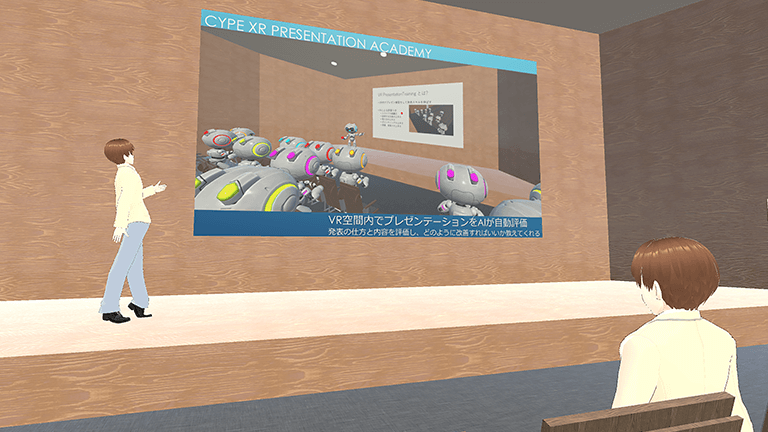
CYPE XR Presentation Academy is a next-generation presentation practice system in which AI automatically evaluates your presentations within a VR space.
CYPE XR Presentation Academy is a next-generation presentation practice system in which AI automatically evaluates your presentations within a VR space. It evaluates both the delivery and the content of lectures and presentations, and tells you how to improve them.
Unlike existing products that only assess aspects such as volume and speaking speed, it evaluates the content itself and even suggests revisions.
You can also reflect on your performance by reviewing your presentation inside VR.

Key Points

Practice presentations in various scenes within VR
AI automatically evaluates slide content, speaking style, and movements
Record your presentation in 3D and review it from a third-person perspective
Check questions from multiple viewpoints through automatically generated Q&A
Accumulate practice data and visualize your growth
Even slide + voice–only presentations can be analyzed, allowing for easy practice

Your Benefits

Learner Side

Company / School Side

Key Features

We will introduce the main features of CYPE XR Presentation Academy in a video.

01 | Practice in various presentation scenarios within VR

You can switch between different situations and audiences—such as “lecture style,” “poster session,” or “one-on-one conversation” – to practice according to your presentation environment.
Example scenarios
  • Giving a lecture to 100 people tomorrow → practice in a large hall with 100 AI audience members
  • Want to practice for a small meeting → practice in a meeting room with 5 AI audience members

02 | Presentation evaluation using voice/image recognition and generative AI

Your presentation is evaluated across five elements: clarity of content, slide structure, speaking style, eye contact, and pointing.
AI identifies issues and supports effective improvement, enhancing both “content creation” and “delivery” to make your message more impactful.

User Experiences
  • After presenting, I was told “This part of the slide is unclear” and “This text may be too small.” When I revised it, the slide became easier to understand.
    I was told “You are looking at the slides too much,” which made me realize I wasn’t maintaining eye contact with the audience.

03 | Q&A Practice with Generative AI and Speech Synthesis

AI automatically generates questions based on your slide structure and what you said.
The AI asks questions by voice, allowing you to practice responding on the spot.
User Experiences
  • I thought some parts didn’t need explanation, but through Q&A with the AI, I realized I needed to explain the assumptions.
  • Being asked about weak points in my reasoning beforehand helped me prepare for the actual presentation.

04 | Review Function to Revisit Your Presentation

By watching your past presentations, you can feel your own improvement.
Your presentation can also be recorded in 3D, allowing you to review it from a third-person perspective after practice.
You may notice habits you wouldn’t catch in regular video recordings.
User Experiences
  • Seeing myself in 3D made me realize I sounded unsure during the presentation. I want to be careful about that in the actual session.

Basic Specifications

[Material Creation]

Hardware PC (Windows 11)
Software Microsoft PowerPoint
Production Environment Windows administrator privileges* required
*Administrator privileges: Account permissions that allow system settings and installations on Windows.

[Presentation Practice]

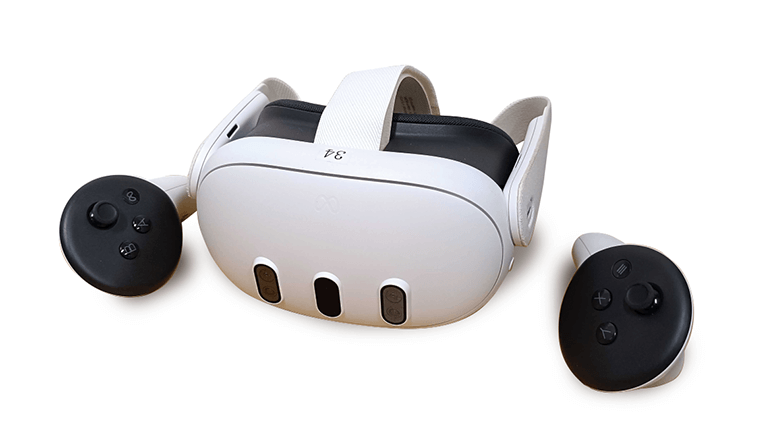
Hardware ⟪ VR Headset ⟫
Meta Quest series
⟪ PC ⟫
Windows 11
Software ⟪ VR Headset ⟫
XR Presentation Academy Application
⟪ PC ⟫
XR Presentation Academy PowerPoint Add-on
Cloud System XR Presentation Academy Cloud System (Server) (On-premise supported)
Usage Environment Recommended area of 2m x 2m or larger / Internet connection environment

Pricing Plans / Delivery Format

Pricing Model
Displayed prices include tax.

Standard Plan

From12 million yen
-Hardware: 10 Meta Quest series headsets
-Software: XR Presentation Academy Application (VR)
-Cloud System: 1 year of XR Presentation Academy Cloud System

Entry Plan

From 3 million yen
-Software: XR Presentation Academy Application (VR)
-Cloud System: 1 year of XR Presentation Academy Cloud System
* If you already have the hardware, please choose the Entry Plan.
* On-premise support is also available. Please contact us for details.
上部へスクロール